

 kamran sharief
 Table of Contents
Definition:
Node.js security news is about recently released security vulnerabilities, security updates, third-party risks, patches and security advice relevant to the Node.js development process.
It’s advisable for Node.js developers to read the security bulletins and update their application with the current versions of Node.js and external npm dependencies to keep their projects protected from the threats.
Node.js Security News: Latest Vulnerabilities, Security Releases and Updates
One of the most popular of javascript runtimes to make webapps, APIs, backed services, CLIs and realtime platforms, Node.js has grown exponentially since the early days. And given the typical Node.js app usage, many of it depending on multiple numbers of third-party npm packages, Node.js news about its own runtime itself and/or about its popular npm modules has become of vital importance in app security. From attacks like prototype pollution to DOS issues, permission bugs, unsafe app configurations and etc… There are all kinds of security vulnerabilities out there concerning Node.js applications.
The key challenge, however is not if a vulnerability has been reported.
But rather if you’re currently using the reported Node.js version or npm dependency.
What Is Node.js Security News?
Node.js security news refers to announcements and updates concerning security vulnerabilities, security releases, patches and other threats affecting Node.js and its ecosystem.
Important updates may involve:
- Node.js runtime vulnerabilities
- npm and dependency vulnerabilities
- Security releases
- Denial-of-service vulnerabilities
- Memory-related security issues
- Permission and access-control weaknesses
- HTTP and networking vulnerabilities
- Cryptographic issues
- Supply-chain security concerns
- Vulnerable third-party packages
The Node.js Project occasionally releases updates for security vulnerabilities which means that developers need to be watchful about which version of Node.js is used in their applications as well as which dependencies are being used in application development.
Why Node.js Security News Matters for Developers
There could be hundreds or even thousands of transitive dependencies in any given Node.js application. There could also be a dependency buried somewhere in the chain, that is not directly used by my application’s code but that I may introduce as part of using some other, high-level dependency and it represents an attack surface that my application might inherit.
Security monitoring helps developers identify:
- Whether their Node.js version is affected.
- Whether an available security release fixes the issue.
- Whether an npm dependency requires updating.
- Whether temporary mitigation is necessary.
- Whether production systems need to be redeployed.
This makes security news particularly important for teams maintaining APIs, SaaS platforms, e-commerce systems and other internet-facing applications. For more related articles visit our website
Where to Find Reliable Node.js Security News
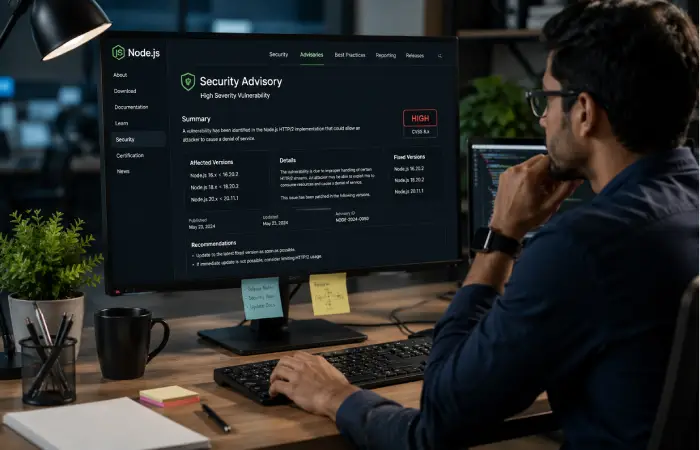
When researching Node.js security news, developers should prioritise primary sources instead of relying exclusively on social media posts or security blogs.
Useful sources include the official Node.js security releases, Node.js documentation, npm security information and established vulnerability databases.
The most useful information to verify includes:
- Vulnerability identifier
- Affected Node.js versions
- Fixed versions
- Severity
- Security impact
- Available mitigation
- Release date
- Required upgrade
A security headline without version information is often not enough to determine whether your application is actually affected.
How Node.js Security Vulnerabilities Can Affect Applications
The impact of a vulnerability depends on the affected component and how the application uses it.
Potential consequences can include:
Denial of Service
Some vulnerabilities can allow specially crafted requests or inputs to consume excessive resources or trigger application instability.
Information Exposure
Certain security weaknesses may expose information that should not be accessible to an attacker.
Remote Code Execution
Although less common, vulnerabilities that enable arbitrary code execution can have severe consequences because an attacker may be able to execute commands in the application’s environment.
Dependency-Based Attacks
An application can also become vulnerable through an npm package rather than through Node.js itself. This is why dependency auditing is an essential part of Node.js security.
Node.js Security News and npm Dependencies
One of the biggest security considerations in the Node.js ecosystem is dependency management.
A typical application may directly install a relatively small number of packages while indirectly relying on many more packages.
Developers should regularly review dependency security using tools such as:
npm audit
For automatically fixable issues, npm may also provide:
npm audit fix
However, developers should not blindly apply dependency changes to production. Updates should be reviewed and tested because major version changes can introduce compatibility problems.
How to Check Your Node.js Version
Before evaluating a security advisory, determine which Node.js version your system is running.
Use:
node –version
You can also check the npm version with:
npm –version
Compare your installed Node.js version with the affected and fixed versions listed in the relevant official security advisory.
If your version falls within an affected range, upgrading to an appropriate patched release should generally be considered after testing.
How to Respond to a Node.js Security Alert
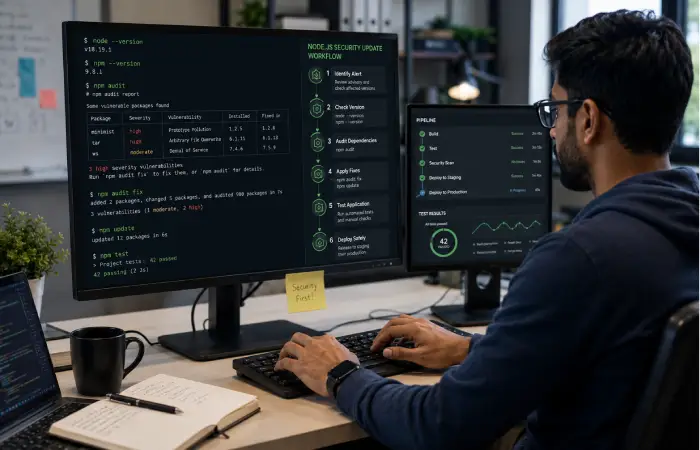
When new Node.js security news is published, developers can follow a straightforward workflow.
1. Verify the Source
Confirm that the information comes from an official Node.js advisory, npm security announcement or another reputable security authority.
2. Identify the Vulnerability
Record the vulnerability identifier and understand what component is affected.
3. Check Your Version
Run:
node –version
Then compare the installed version with the affected versions.
4. Review Dependencies
Run:
npm audit
Review the results rather than treating every warning as equally critical.
5. Upgrade Safely
Move to a supported patched Node.js release or update the affected dependency when appropriate.
6. Test the Application
Run your normal automated tests and check important application functions before deploying the update.
7. Deploy the Fix
After validation, deploy the patched version through your normal release process.
Best Practices for Node.js Application Security
Following security news is only one part of maintaining a secure application.
Developers should also:
- Keep Node.js on a supported release line.
- Update vulnerable dependencies.
- Remove unused npm packages.
- Use lockfiles consistently.
- Review dependency changes.
- Avoid exposing secrets in source code.
- Validate user input.
- Apply appropriate authentication and authorisation.
- Use secure HTTP configurations.
- Implement rate limiting where appropriate.
- Monitor application logs.
- Scan dependencies regularly.
- Protect production environment variables.
- Use least-privilege permissions.
Security should be treated as an ongoing development process rather than a one-time configuration task.
Node.js Security News vs npm Security News
These two areas are related but not identical.
Node.js security news generally focuses on vulnerabilities and security updates affecting the Node.js runtime and associated official components.
npm security news can involve vulnerabilities in packages distributed through the npm ecosystem.
This distinction matters because updating Node.js does not automatically fix every vulnerable npm dependency in an application.
Developers should therefore monitor both areas.
How Often Should You Check Node.js Security Updates?
Teams running production Node.js applications should monitor security announcements continuously rather than waiting for a scheduled annual review.
A practical approach is to:
- Monitor official Node.js security announcements.
- Review dependency alerts regularly.
- Check Node.js releases before major deployments.
- Keep development and production environments aligned.
- Establish an internal process for high-severity vulnerabilities.
Automated dependency monitoring can also help teams identify newly disclosed vulnerabilities more quickly.
Frequently Asked Questions
What is Node.js security news?
Node.js security news covers security vulnerabilities, patches, advisories, security releases and other updates affecting the Node.js runtime and its ecosystem.
How can I check whether my Node.js version is vulnerable?
Check your installed version with node –version and compare it with the affected and fixed versions specified in the relevant official security advisory.
Does npm audit check Node.js itself?
No. npm audit primarily checks installed npm packages and their dependency vulnerabilities. Node.js runtime vulnerabilities should be checked through official Node.js security information.
Should I update Node.js when a security release is announced?
If your installed version is affected, upgrading to a patched and supported release is generally recommended after checking compatibility and testing the application.
Is an npm package vulnerability the same as a Node.js vulnerability?
No. A Node.js vulnerability affects the runtime or related Node.js components, while an npm vulnerability generally affects a package or dependency used by an application.
Conclusion
Staying informed of news around Node.js security enables you to react more promptly to exploits to your runtime and your dependencies. But be confident, it is best to do so by checking information through the official security bulletins. Look for vulnerable versions, research your app’snpm’npm”dependency’eview your dependencies’, and have verified security upgrades readily available.
For productive apps, supplement auditing with watchful monitoring, stable version, safe software coding conventions, as well as testing your program frequently.
This works significantly better than security updates alone.